
You should migrate to Magento 2 because Magento 1 has had no security or support since June 2020, and Magento 2 is faster, safer, and built for mobile. The risk most people miss is SEO. A rushed move changes your URLs, drops your redirects, and can wipe out rankings you spent years building. This guide covers why you should migrate to Magento 2 and the exact steps that keep your Google traffic intact.
Introduction
Magento 1 stopped getting security patches in June 2020. Running it now risks your data and your sales. So the case to move is clear. But here is the part most guides skip. A migration is a full rebuild, not an upgrade. Your URLs, redirects, and page structure can all change, and if you get that wrong, your rankings fall off a cliff on launch day. This post answers why you should migrate to Magento 2, what it costs, how long it takes, and the SEO plan that protects your traffic through the move.
Why migrate to Magento 2?
If you are weighing whether to migrate to Magento 2, the reasons come down to six things:
- End of life: Magento 1 has had no official security patches since June 2020. Every month, it adds risk.
- Speed: Magento 2 loads faster, with full page caching built in. Faster pages mean more sales and better rankings.
- Mobile: Magento 2 is built mobile-first and supports PWA Studio for app-like speed on phones.
- B2B and scale: Magento 2 handles larger catalogues and higher traffic, with B2B features in the Adobe Commerce edition.
- Checkout: Magento 2 swaps the old six-step checkout for a two-step flow with Instant Purchase, which cuts cart abandonment.
- Future support: new extensions, themes, and updates are built for Magento 2. Magento 1 gets none of them.
The right time to move is now rather than later. The longer you stay on an unsupported platform, the more risk builds up, and the more your rivals pull ahead in speed and features.
Adobe’s own guidance is to move off Magento 1 as soon as you can, since running unsupported software on your core sales channel is a serious risk.
Top reasons UK businesses switch to Magento 2
For UK stores, three drivers come up again and again:
- Compliance and card security, since an unpatched store puts PCI DSS compliance at risk.
- Mobile sales, as more UK shoppers buy on phones than desktops.
- Growth, since Magento 2 copes with bigger catalogues and busy sale periods without slowing down.
How does Magento 2 improve security?
Magento 2 gets regular security patches, stronger password hashing, and better protection against common attacks. Magento 1 gets none of this now. On its own, moving to a supported platform is the single biggest security gain you can make. Staying put means known holes stay open.
What performance gains does Magento 2 bring?
Magento 2 ships with full page caching and works with Varnish, so pages serve faster under load. It handles more orders per hour and copes better with traffic spikes. Faster category and product pages help two things at once: shoppers buy more, and Google rewards the speed with better rankings.
The part most guides skip: your rankings can crash during the move
A migration is where SEO goes wrong. Here is why traffic drops on launch day:
- Your URLs change. Magento 2 builds URLs differently, so old links can break.
- Your redirects get lost. The 301 rules that pointed old pages to new ones do not carry over on their own.
- Your structure shifts. New categories and templates can change how pages link together.
- Duplicate content appears. A fresh build often ships with canonical settings switched off, so copies pile up.
Get these wrong, and Google drops your pages, sends visitors to dead links, and hands your positions to competitors. The fix is planning, not luck.
Protect your rankings: the migration SEO checklist
Work through this before and during the move:
- Map every old URL to its new one. Crawl the Magento 1 store first and export the full list, so nothing gets missed.
- Set a 301 redirect for every URL that changes. This is the single biggest factor in keeping your rankings. Google passes the old page’s value to the new one through a 301.
- Turn the canonical settings back on. On the new build, set “Use Canonical Link Meta Tag for Products and Categories” to Yes, so copies do not split your signals.
- Move your metadata and schema. Bring across page titles, meta descriptions, and product and review structured data, or your rich results will vanish.
- Migrate and resubmit the sitemap. Generate a clean XML sitemap on Magento 2 and submit it in Google Search Console on launch day.
- Crawl before and after. Run Screaming Frog or Sitebulb on the old site, then the new one, and compare. Any page in the first list missing from the second needs a redirect.
- Keep Magento 1 reachable until redirects are verified. Do not pull it down the moment you launch.
- Watch Search Console for a few weeks. A small dip right after launch is normal as Google recrawls. A sharp cliff means a broken redirect map. Fix it fast.
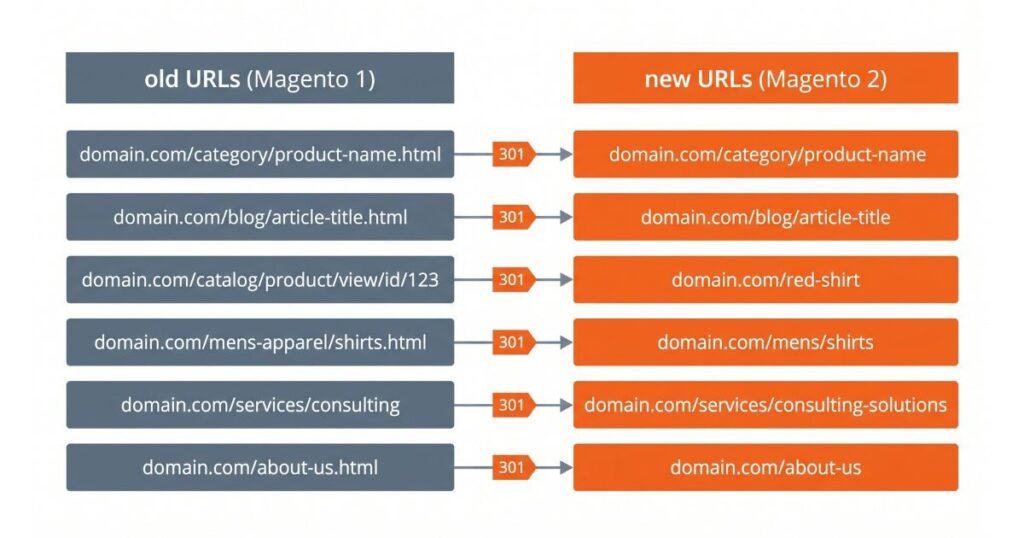
In my experience, a lost redirect map is the top cause of traffic drops after a Magento migration. Build it before you touch anything else.
Google’s own site move guidance says the same in short: keep your URLs where you can, redirect the ones that change, and submit a fresh sitemap.
What the migration tool does not move
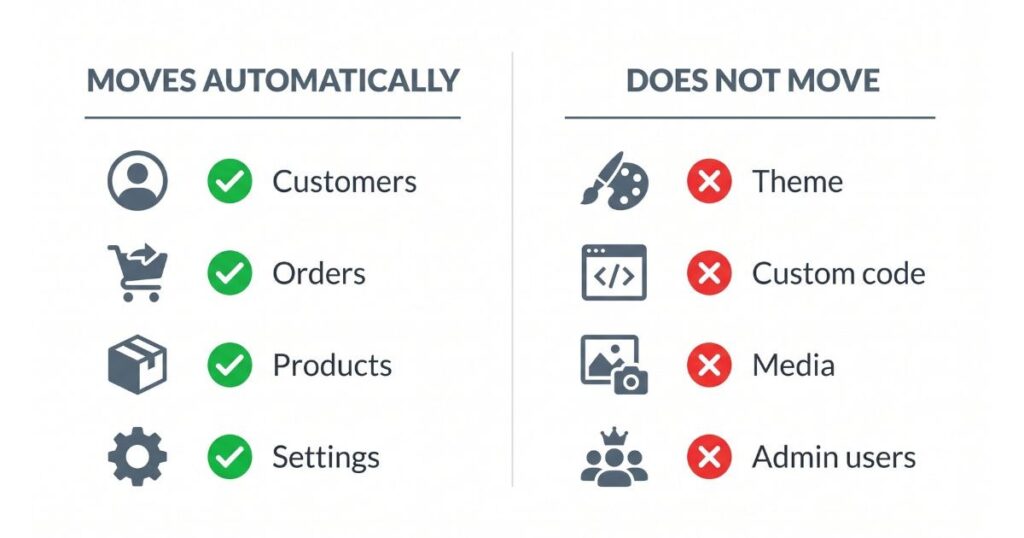
The official Data Migration Tool moves customers, orders, products, and settings. It does not move everything. These do not carry over on their own:
- Your theme and frontend design
- Custom code and many third-party extensions
- Media and images
- Admin users and passwords
This matters for SEO. If media and image URLs change and nobody sets redirects, your image search traffic and page speed both suffer. Plan these by hand.
How to confirm the migration kept your rankings
Do not assume the move went well. Check it. In the first two to four weeks after launch:
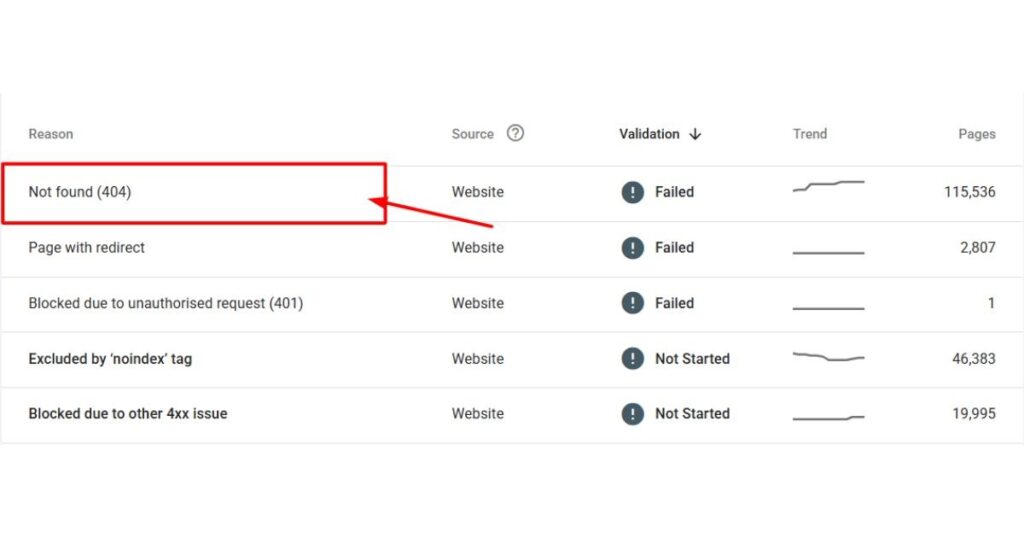
- Open the Google Search Console Pages report and watch for a spike in “Not found (404)”. That points to missing redirects.
- Compare impressions and clicks against the weeks before launch. A small dip is normal. A steep, steady drop is a problem.
- Spot-check your top twenty pages by traffic. Type each old URL and confirm it lands on the right new page.
- Recrawl the site and confirm the sitemap and canonical tags are in place.
Catch a broken redirect in week one, and you recover fast. Miss it for a month, and the damage sets in.
How long does a Magento 2 migration take?
For most stores, a safe estimate is three to six months. A small catalogue with a few customisations sits at the short end. A large store with heavy custom code and many integrations sits at the long end. Rushing it is how rankings get lost, so build in time for testing and the redirect map.
How much does it cost to migrate to Magento 2?
Cost tracks the size of your store and how much custom work it carries. Typical UK ranges look like this:
- Small store, light customisation: £8,000 to £15,000
- Mid-size store: £15,000 to £35,000
- Large or B2B store with heavy custom code: £35,000 and up
These are market ranges, not a quote. [Imran: replace with your own figures.] A clean, well-planned move costs less than fixing a broken one after launch.
Should you move to Shopify or WordPress instead?
Sometimes a content-led form fits better. A plain comparison:
- Shopify: hosted and simpler to run, with less control over the code. Good for stores that want less technical upkeep.
- WordPress with WooCommerce: content led, best for smaller catalogues and blog-heavy sites.
- Magento 2: most control, best for large catalogues, complex pricing, and B2B. It needs more technical support to run.
If you have a big catalogue, custom pricing, or B2B needs, Magento 2 usually wins. If your store is small and simple, a lighter platform may serve you better. Whichever you pick, the same rule holds: map your URLs and set redirects, or you lose rankings.
Does a migration affect AI search and AI Overviews?
Yes, and a few store owners plan for it. AI Overviews and chat assistants pick one page to cite, then link it. If your migration breaks the URL that AI systems already trust, you drop out of those answers, the same way you drop out of normal search. A clean move, with redirects and one clear URL per page, keeps you in the running for AI citations. A messy one hands that space to a competitor.
FAQ
Q: Is Magento 1 still safe to use?
No. Magento 1 has had no official security patches since June 2020. Every month on it leaves known holes open, which puts customer data and card compliance at risk.
Q: Can I migrate to Magento 2 without losing rankings?
Yes, with a redirect map. Crawl the old site, list every URL, and set a 301 for each one that changes. Keep the canonical settings on and resubmit your sitemap. Do that and rankings usually hold or recover within weeks.
Q: How do I move Magento to a new server?
That is a hosting move, not a version move. Copy the files and database, point your DNS to the new server, and test. If the domain and URLs stay the same, you do not need redirects. If they change, you do.
Q: Do I need a developer to migrate?
For anything beyond a tiny store, yes. A migration touches the database, theme, extensions, and server. A specialist protects your data and your rankings through the move.
What to do first
Start with the decision, then the safety net. Magento 1 is unsupported, so the case to migrate to Magento 2 is settled: you gain speed, security, and a platform with a future. Before you move a single page, crawl your current store, build the URL map, and plan a 301 redirect for every change. Turn on canonical settings, move your metadata and sitemap, and keep the old site up until the redirects check out. Do this and you get the new platform without paying for it in lost rankings. If your store is large or came from years of custom work, get a specialist to run the magento migration services and the SEO plan together.