
Most Magento duplicate content comes from three settings, not code: category paths in product URLs, inconsistent URL suffixes, and product variants that each get their own page. Turn on Magento’s canonical tag settings, switch off category paths in product URLs, and hide variant pages from search. This guide also gives you a table for picking the right fix and the mistakes that make the problem worse.
Introduction
Your Magento store shows the same product on more than one URL. Google sees the copies, cannot tell which one to rank, and splits your traffic between them. This is Magento duplicate content, and it is one of the most common reasons a store ranks lower than it should.
Most guides hand you the same generic list. This one gives you the exact settings, a decision table for canonical versus noindex versus redirects, and the fixes that quietly backfire. You can do most of it in the admin in under an hour.
What are the common causes of duplicate content in Magento 2?
Magento 2 can build duplicate URLs in a few ways:
- Category paths in product URLs, so one product sits at two or more addresses.
- URL suffix, trailing slash, and upper or lower case mismatches.
- Product variants, where each colour or size gets its own near-identical page.
- Layered navigation filters, which add parameters and multiply URLs.
- Multiple store views showing the same products under different base URLs.
The first three cause most of the damage. The rest are covered below. Adobe Commerce documentation on URL and SEO settings shows where each control lives.
Source 1: Category paths in product URLs
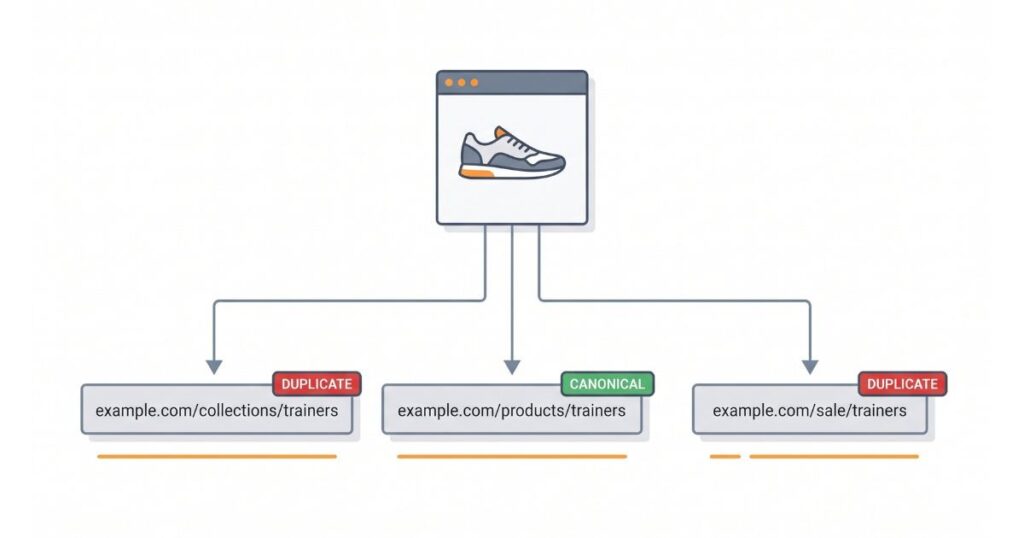
Magento can put the category inside a product URL. That turns one product into several addresses:
- yoursite.co.uk/shoes/blue-trainers.html
- yoursite.co.uk/sale/blue-trainers.html
- yoursite.co.uk/blue-trainers.html
Same product. Three URLs. Three copies, as far as Google is concerned.
The fix:
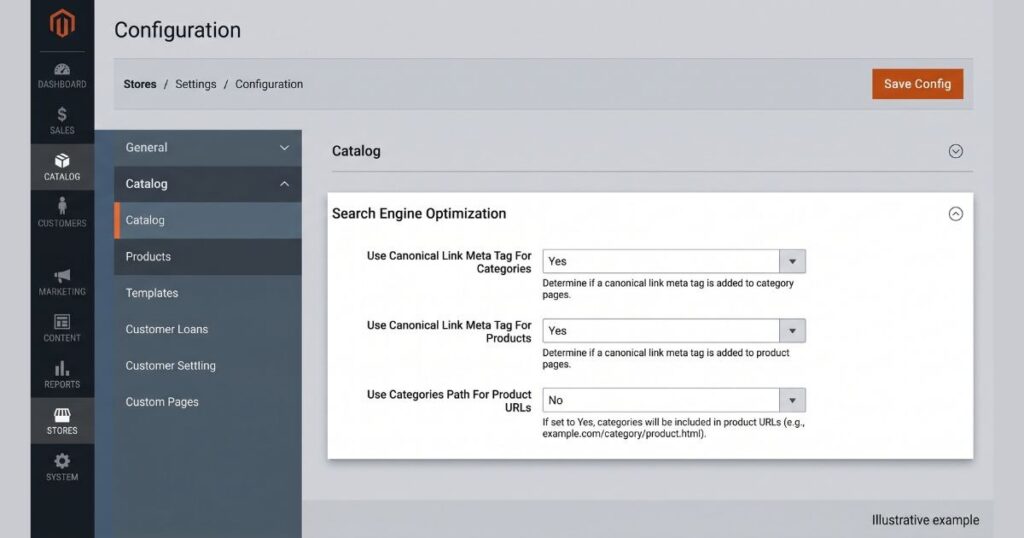
- Go to Stores, then Configuration, then Catalog, then Catalog.
- Open the Search Engine Optimization section.
- Set “Use Categories Path for Product URLs” to No.
Magento 2 ships with this set to No, which is correct. Check that yours was not switched on, which often happens after a move from Magento 1. One product should live at one clean URL.
Source 2: URL suffixes, slashes, and case
The same page can load at more than one address when the URL is not consistent:
- With and without a .html suffix
- With and without a trailing slash
- In upper and lower case, since Google reads /Trainers and /trainers as two pages
Each version is a separate URL to Google, even though the page is identical.
The fix:
- Pick one URL suffix and keep it. Set it once in the same Search Engine Optimization section, then leave it alone.
- Keep internal links in one consistent case, and redirect the odd ones out to the clean version.
- Turn on canonical tags so every version points to one chosen URL. This step matters most, and it is off by default in Magento 2:
- Set “Use Canonical Link Meta Tag for Categories” to Yes.
- Set “Use Canonical Link Meta Tag for Products” to Yes.
A canonical tag is a line in the page code that tells Google, “this is the main version, index this one.”
Source 3: Product variants
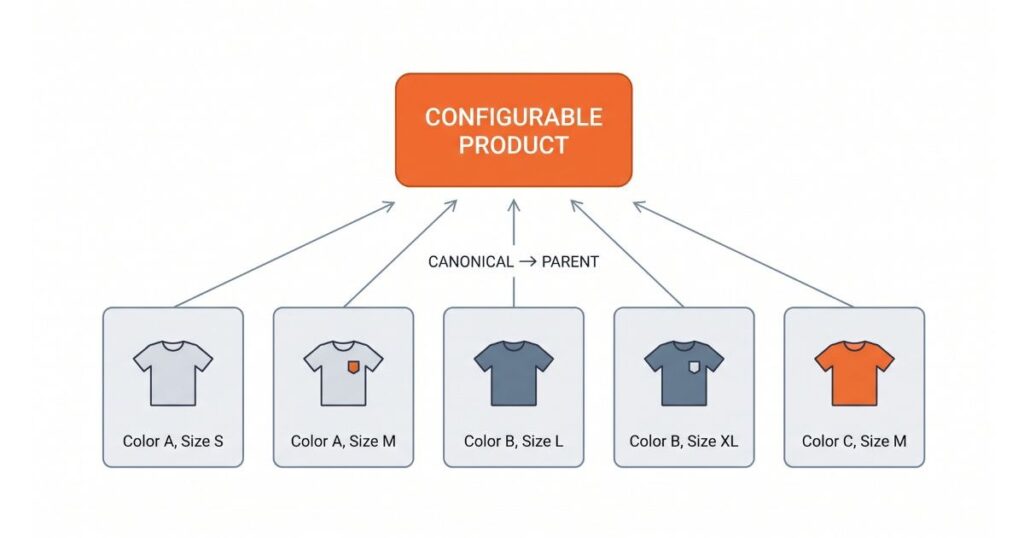
A configurable product, like a t-shirt in five colours, is built from child items called simple products. If each simple product gets its own URL, you have five near-identical pages fighting each other.
The fix most guides skip: set each child simple product’s “Visibility” to “Not Visible Individually”. The variant still works on the main product page. It just stops getting its own indexable URL. Where you do want a variant page live, add a canonical tag pointing to the parent product. This keeps one strong product page instead of five weak copies.
Which fix to use: canonical, noindex, 301, or robots.txt
Most stores reach for the wrong tool. Here is a plain guide to matching the problem to the fix:
| Problem | Right fix | Why |
| Same product on several category URLs | Canonical tag | Keeps the page, sends signals to one version |
| Filter and sort pages with no search value | Noindex, follow | Removes them from search, keeps link flow |
| Old URL moved to a new one | 301 redirect | Sends users and signals to the new page |
| Private pages like cart, account, checkout | Robots.txt disallow | Stops crawling of pages you never want seen |
| Internal search result pages | Noindex or robots.txt | Keeps low value pages out of the index |
The rule of thumb: canonical to keep a page, noindex to hide it, 301 to move it, and robots.txt only for pages Google should never crawl.
Duplicate content fixes that backfire
These common moves make things worse:
- Blocking a URL in robots.txt and expecting it to drop from the index. Robots.txt stops crawling, so Google never sees the noindex or canonical on that page. Use noindex instead, and let Google crawl it.
- Adding a canonical tag and a noindex tag to the same page. These send mixed signals. Pick one.
- Pointing every paginated page back to page one with a canonical. Google reads that as wrong, since page two is not a copy of page one. Let paginated pages self canonical, or noindex the deep ones.
- Using rel=next and rel=prev for pagination. Google stopped supporting these in 2019. They do nothing now.
Step by step: turning on canonical tags in Magento
Here is the short version you can run right now:
- Log in to your Magento admin.
- Go to Stores, then Configuration, then Catalog, then Catalog.
- Open Search Engine Optimization.
- Set “Use Canonical Link Meta Tag for Categories” to Yes.
- Set “Use Canonical Link Meta Tag for Products” to Yes.
- Set “Use Categories Path for Product URLs” to No.
- Save, then clear the cache under System, Cache Management.
Reindex if your store asks. Then give Google a few weeks to recrawl and drop the copies. In my experience, these canonical settings being off is the single most common Magento duplicate content miss on stores that have never had an SEO pass.
Does duplicate content affect AI Overviews and AI search?
Yes, and few store owners plan for it. AI Overviews and chat assistants pick one source to quote, then link it. When your product sits on five URLs, the signals that tell a system which page is the real one get split, the same way they do in normal search.
One clean, canonical URL per page gives these tools a single strong page to trust and cite. So this work is not only about ranking now. It also decides whether AI search points to your page or skips past it.
Is duplicate content bad for SEO?
Not in the way most people fear. Google has said many times there is no duplicate content penalty for normal cases. The cost is different. Google splits ranking signals across the copies, picks one version on its own, and spends crawl budget on pages you never wanted indexed. It will not get your store banned, but it holds your rankings down.
How much duplicate content is acceptable?
There is no fixed number. Some repeated text, like shipping details or a size guide across products, is normal, and Google handles it. The real problem is full-page duplication, where whole product or category pages exist at several URLs. Aim for one indexable URL per unique page.
How do I audit my Magento store for duplicate content?
Start with two checks:
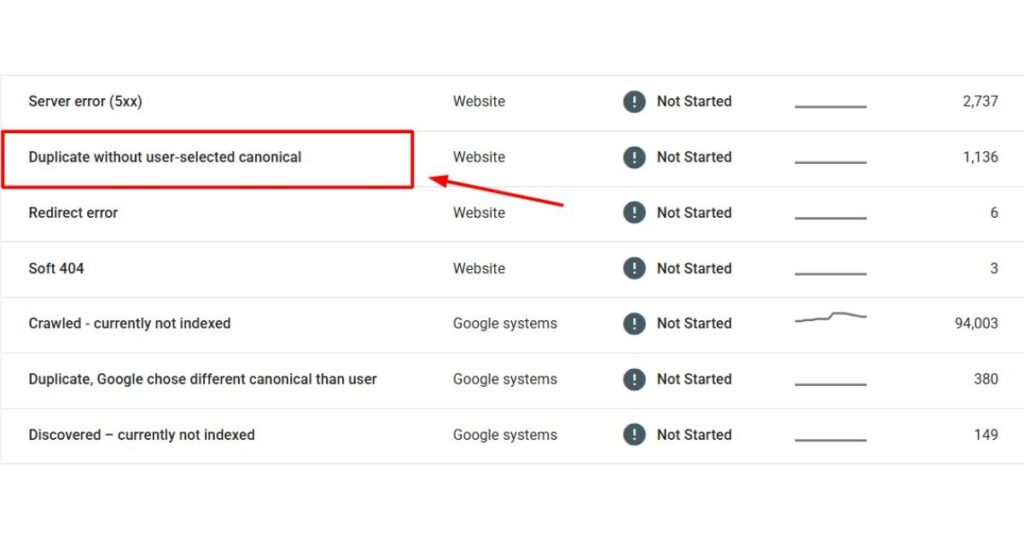
- Google Search Console: open the Pages report and look for “Duplicate without user-selected canonical” and “Crawled, currently not indexed”. High numbers point straight at the problem.
- A crawler: run Screaming Frog or Sitebulb. Sort by page title. Rows with the same title but different URLs are your duplicates.
Then confirm the fix. Run the same crawl two to three weeks after your changes. The duplicate count should fall. If it holds, a filter or a store view is still open. Note that the old Search Console URL Parameters tool is gone, so ignore any guide that still tells you to use it.
Do you need a Magento extension for canonical URLs?
For most stores, no. The native settings cover products and categories. An extension earns its place when you need finer control, like canonical rules for filtered pages. Known options are Mageplaza SEO, Amasty SEO Toolkit, and MageWorx SEO Suite. Try the built-in settings first.
Can you hire a UK expert to fix Magento duplicate content?
Yes. If your catalogue is large, or a migration left a mess, a specialist is faster than trial and error. A UK-based Magento SEO Audit service will audit the store, set the canonical and URL rules, hide variant pages, and confirm the copies drop out of Google. Ask to see before and after data from a real Magento store first.
FAQ
Q: How do I duplicate a page in Magento?
This is a different task from fixing duplicate content. To copy a product, open it and use “Save as New”, or the duplicate action in the product grid. To copy a CMS page, go to Content, then Pages, and use the copy option. Copying on purpose is fine. The SEO problem is the unplanned copies at extra URLs.
Q: Will fixing duplicate content lose me rankings?
Done right, no. You keep one strong version and point the rest to it. Rankings usually hold or rise once Google stops splitting signals.
Q: How long until Google drops the duplicates?
Usually a few weeks. Large catalogues take longer, since Google recrawls them slowly. A clean sitemap in Search Console speeds it up.
Q: Do canonical tags work on their own?
They are a strong hint, not a hard rule. Google follows them in most cases. Pair them with the URL settings above so the copies are not created in the first place.
What to do first
Start in the admin. Turn on both canonical settings, switch off category paths in product URLs, and hide variant pages from search. Use the table to match every other issue to the right tool, and skip the fixes that backfire. Then run one crawl to catch anything left. Clear most Magento duplicate content this way, and both Google and AI search get one clean page to rank. If the store is large or came from a Magento 1 migration, get a specialist to check the result.